
Cookies help us deliver our services. By using our services, you agree to our use of cookies.
Welcome, Please Sign In!
National Symbols Cache uses login.gov to manage secure logins to our store.
You need a login.gov account to show at National Symbols Cache. To learn more about login.gov, see Frequently Asked Questions below.
IMPORTANT: For 'Agency Selection' choose 'U.S. Department of Agriculture'.
See Frequently Asked Questions below for more info.
Frequently Asked Login Questions
When you first click 'Login' to use your current login.gov account, you will be taken through authentication steps which are quick and easy:
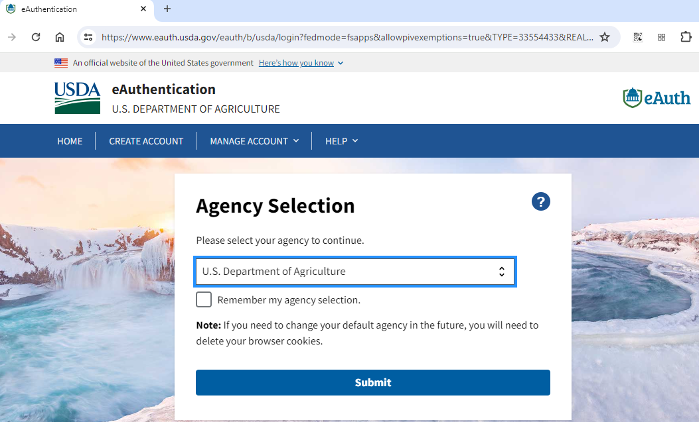
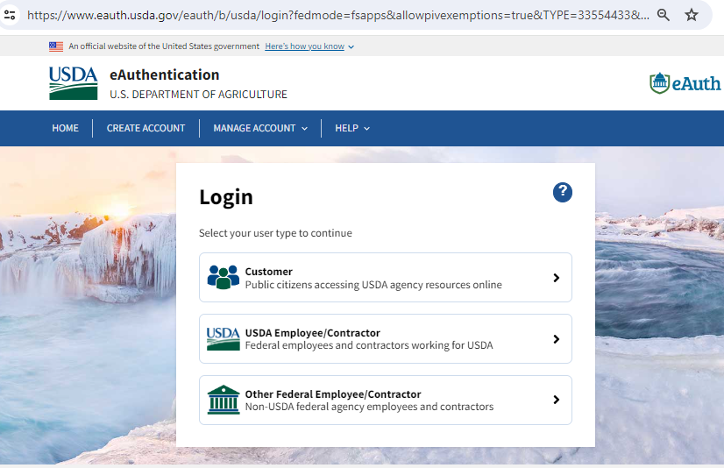
- Agency Selection. “U.S. Department of Agriculture” and then hit 'submit'.
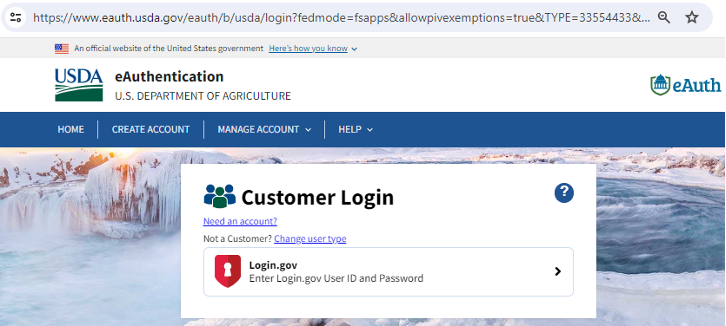
- Click the text link just under “USDA Federal Login' titled 'CHANGE USER TYPE'
- Click “Customer”
-
Click “login.gov”
You will then be taken to the login.gov sign in page where you use your username and password, plus the two step authentication you set up in your account, and after successfully login, you will be returned to the National Symbols Cache website to continue shopping.
If your issue seems to be only during the login.gov experience (not when you are on the National Symbols
Cache
website) you can get further help from login.gov help desk to expedite your access.
LOGIN.GOV HELP DESK: 844-875-6446
HERE ARE SCREENSHOTS OF THE STEPS LISTED ABOVE.
Click "U.S. Department of Agriculture"
Click “Change Customer Type”
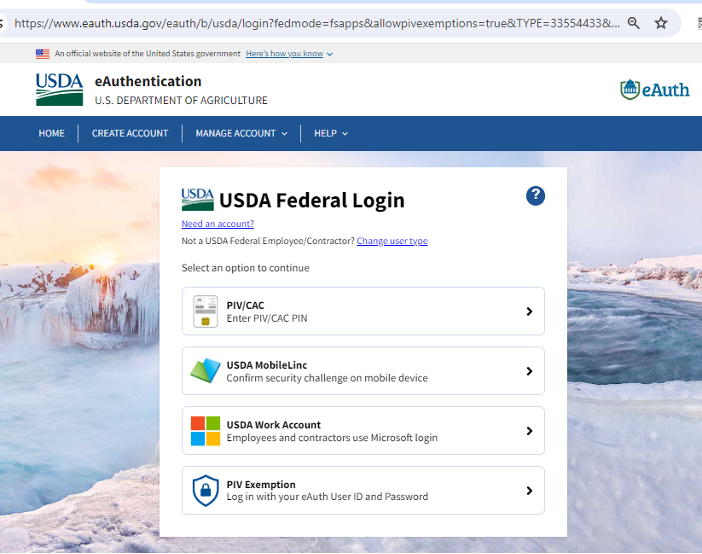
Click “Customer”
Click “login.gov”
Login.gov is a secure sign in service used by the public to sign in to participating government agencies. Participating agencies will ask you to create a Login.gov account to securely access your information on their website or application. You can use the same username and password to access any agency that partners with Login.gov. This streamlines your process and eliminates the need to remember multiple usernames and passwords. Login.gov is used to secure your account when you apply for:
- Federal jobs (USAJOBS - Office of Personnel Management)
- Global Entry (Trusted Traveler Programs - Department of Homeland Security)
- Small business loans and disaster assistance (Small Business Administration)
- And more…
Learn more on login.gov.
Participating agencies like us use Login.gov to help protect their users. When you try to sign in to National Symbols Cache, you'll be prompted to 'sign in' or 'create an account' with Login.gov if you don't already have one, before you can shop, or access your account with us.
In addition to your password, Login.gov requires that you set up at least one authentication method to keep
your account secure. This is multifactor authentication (MFA). We use MFA as an added layer of protection to
secure your information.
Learn more on the login.gov
website about
Authentication.
If you experience problems when logging in, we want to help.
I already have a login.gov account but I couldn't login.
You will need to contact login.gov if there is a problem with your account. They have a great help desk who
can quickly resolve any issues you might have. Simply visit their help page on the login.gov website or call
the
phone number below.
LOGIN.GOV HELP DESK: 844-875-6446
I successfully logged into my login.gov account from National Symbols Cache login page, but it did
not
return me to Symbols, and I still cannot shop or access my account.
If you clicked 'Login to My Account' and landed on the login.gov page where you can enter your user name and
password for your login.gov, account, but after successfully logging in, you were not returned to Symbols,
there may be a problem with your account in our system. If this is the problem, please contact use using the
information below:
EMAIL: SM.FS.symbols@usda.gov
PHONE: 218-322-2761
FAX: 218-327-4581
Learn more on the login.gov
website about
Authentication.